Create a Table of Contents from Headings in JavaScript
Build a JavaScript table of contents from headings with safe IDs, accessible nav, and active section highlighting using IntersectionObserver.

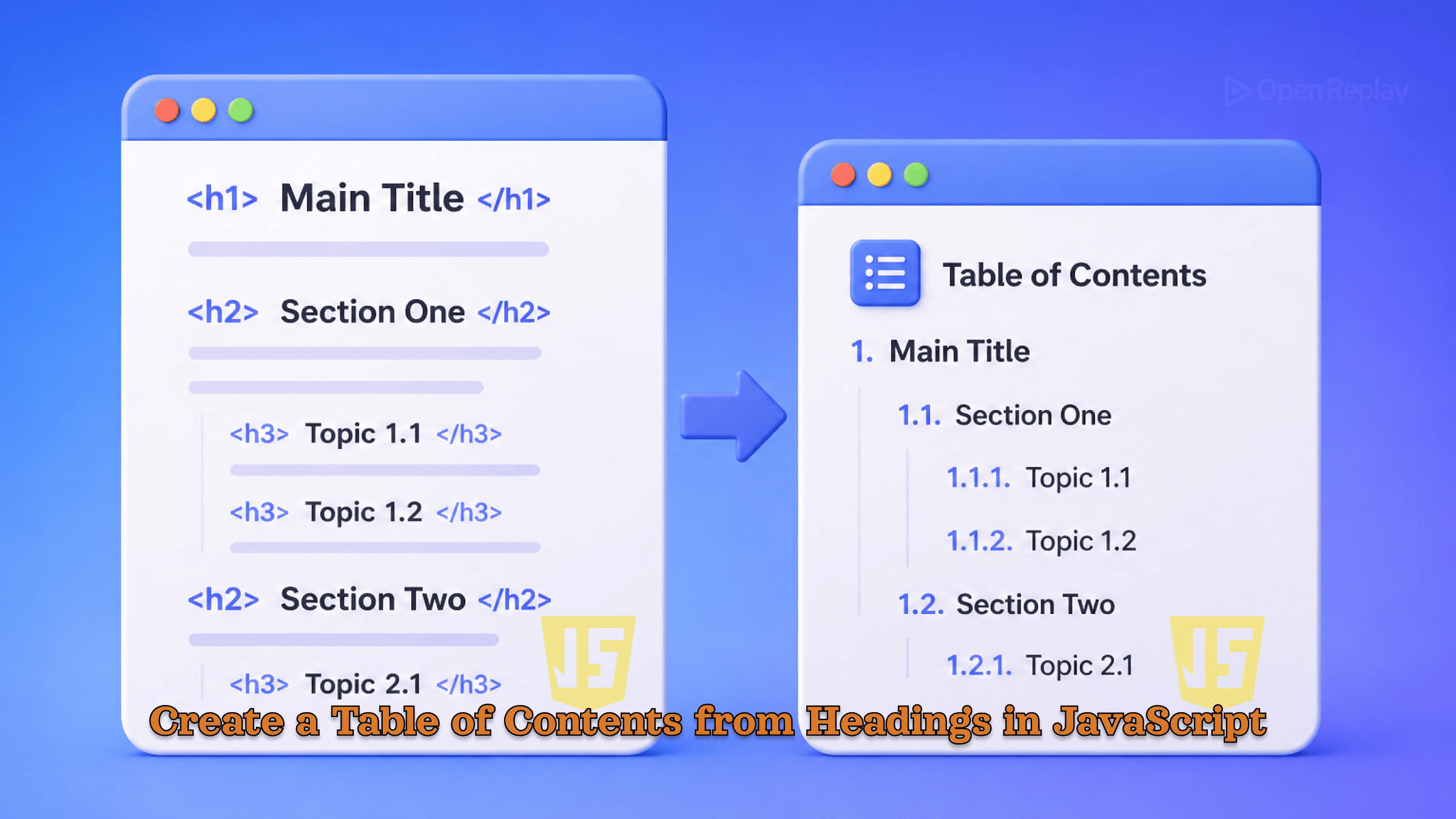
Long pages without navigation frustrate readers. They scroll aimlessly, lose their place, and leave. A dynamic table of contents solves this by turning your existing heading structure into clickable anchor links — automatically, without a library or framework.
This article shows you how to build one using modern vanilla JavaScript, handle common edge cases, add accessible TOC generation, and optionally highlight the active section as users scroll.
Key Takeaways
- Query headings with a scoped selector to avoid pulling in unrelated headings from headers, sidebars, or footers.
- Generate collision-safe, URL-friendly IDs by slugifying heading text and tracking duplicates with a counter.
- Wrap the generated list in a
<nav>element with anaria-labelto create an accessible navigation landmark. - Use
IntersectionObserverinstead of scroll listeners to highlight the active section efficiently. - Enable smooth scrolling with a single CSS rule:
scroll-behavior: smooth.
How DOM Heading Navigation Works
The core idea is straightforward:
- Query all heading elements from the DOM.
- Generate a safe
idfor each heading. - Build a list of anchor links pointing to those IDs.
- Inject the list into a designated container.
No regex parsing of raw HTML. No jQuery. Just querySelectorAll and standard DOM methods.
Selecting and Preparing Headings
const headings = document.querySelectorAll('article h2, article h3, article h4');Scope your selector to the content area — article, main, or a specific container — so you don’t accidentally pick up headings from your site header or sidebar.
Generating Safe Anchor IDs
Heading text often contains spaces, special characters, or punctuation that make URL fragments harder to read or awkward to use in selectors. Normalize each heading’s id before using it:
function slugify(text) {
  return text
    .toLowerCase()
    .trim()
    .replace(/\s+/g, '-')
    .replace(/[^\w-]/g, '') || 'section';
}
Handle duplicates by tracking used slugs and appending a counter:
const usedIds = new Map();

function uniqueSlug(text) {
  const base = slugify(text);
  const count = usedIds.get(base) ?? 0;
  usedIds.set(base, count + 1);
  return count === 0 ? base : `${base}-${count}`;
}
Skip empty or whitespace-only headings with a simple guard: if (!heading.textContent.trim()) return;.
Discover how at OpenReplay.com.
Building the JavaScript Table of Contents
With IDs assigned, build the TOC list and inject it into the page:
function buildTOC(containerSelector, headingSelector) {
  const container = document.querySelector(containerSelector);
  const headings = document.querySelectorAll(headingSelector);
  if (!container || !headings.length) return;

  const nav = document.createElement('nav');
  nav.setAttribute('aria-label', 'Table of contents');

  const ol = document.createElement('ol');

  headings.forEach(heading => {
    const text = heading.textContent.trim();
    if (!text) return;

    const id = heading.id || uniqueSlug(text);
    heading.id = id;

    const li = document.createElement('li');
    const a = document.createElement('a');
    a.href = `#${id}`;
    a.textContent = text;
    li.appendChild(a);
    ol.appendChild(li);
  });

  nav.appendChild(ol);
  container.appendChild(nav);
}

document.addEventListener('DOMContentLoaded', () => {
  buildTOC('#toc', 'article h2, article h3');
});
Using DOMContentLoaded ensures headings exist before the script runs.
Accessible TOC Generation
Wrapping the list in a <nav> element with aria-label="Table of contents" creates a named navigation landmark. Screen readers surface these landmarks directly, letting users jump to the TOC without tabbing through the page.
Preserve a logical heading hierarchy in your content — don’t skip from h2 to h4. The TOC reflects your document’s structure, so gaps in heading levels produce confusing navigation for all users.
Highlighting the Active Section with IntersectionObserver
To highlight which section is currently in view, use the IntersectionObserver API rather than scroll event listeners:
const observer = new IntersectionObserver(entries => {
  entries.forEach(entry => {
    const id = entry.target.getAttribute('id');
    const link = document.querySelector(`nav a[href="#${id}"]`);
    if (link) link.classList.toggle('active', entry.isIntersecting);
  });
}, { rootMargin: '0px 0px -80% 0px' });

document.querySelectorAll('article h2, article h3').forEach(h => observer.observe(h));
The rootMargin shrinks the detection zone so a heading is only marked active when it’s near the top of the viewport. This approach is more performant than throttled scroll handlers and requires no cleanup for most static pages. IntersectionObserver is supported in all modern browsers.
Smooth Scrolling
Add this single CSS rule to enable smooth scroll behavior across the page without any JavaScript:
html {
  scroll-behavior: smooth;
}
The scroll-behavior property is supported in all modern evergreen browsers.
Conclusion
A working JavaScript table of contents needs four things: scoped heading selection, collision-safe ID generation, a semantic <nav> wrapper for accessible TOC generation, and DOMContentLoaded timing. The IntersectionObserver enhancement is optional but adds meaningful UX with minimal code.
This pattern works in any static site, documentation page, or blog — no build step, no dependencies, no framework required.
FAQs
Should I build the table of contents on the server or in the browser?
Either works, but client-side generation is simpler and keeps logic in one place. Server-side rendering is preferable for SEO-critical pages or when JavaScript is disabled, since the anchor links and heading IDs will be present in the initial HTML. For most blogs and documentation sites, client-side generation with DOMContentLoaded is sufficient.
How do I handle headings that already have an id attribute?
Check for an existing id before generating a new one. If a heading has a manually assigned id, reuse it so external links and bookmarks keep working. Add a condition like if heading.id use the existing value, otherwise call uniqueSlug. This preserves author intent and prevents breaking inbound links to specific sections.
Why use IntersectionObserver instead of scroll event listeners?
Scroll events fire dozens of times per second and force layout calculations on every call, which hurts performance especially on mobile. IntersectionObserver observes visibility changes asynchronously and only fires when visibility actually changes. It is also easier to configure thresholds and margins declaratively, without writing throttle or debounce logic yourself.
How can I create a nested table of contents that reflects heading levels?
Track the current heading level as you iterate. When the next heading is deeper, create a nested ol inside the previous li. When it is shallower, walk back up the parent chain. Storing a stack of list elements indexed by heading level keeps the logic clean and supports arbitrary nesting depth without hard-coding each level.


